

RadioButton
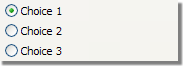
A radio button lets you choose from several options. The
<input>
tags are used to enumerate possible options.
Properties
backColor - string
Background color (btnshadow, white).
border - string
Changes the border style of the control (solid,
double, inset, outset, none).
checkedValue - string
Value linked to the choice.
font-size - integer
Changes the font size.
label - string
Associated label.
nolabel - boolean
Hides the associated label.
readOnly - boolean
Forces the control to read only.
Remarks
Example:
<input type="RadioButton" xpath="@gender" checkedValue="0" label="Choice 1"/>
<input type="RadioButton" xpath="@gender" checkedValue="1" label="Choice 2"/>
<input type="RadioButton" xpath="@gender" checkedValue="2" label="Choice 3"/>