

CodeEdit
Control for editing the source code.
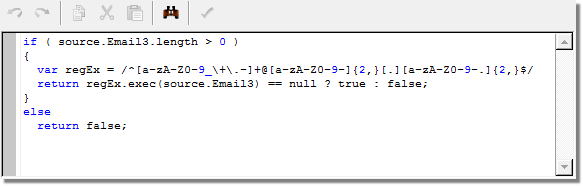
Properties
backColor - string
Background color (btnshadow, white).
border - string
Changes the control outline style (solid, double,
inset, outset, none).
contentType - string
Language of the source code, used for syntaxic
coloring and other options linked to language. The
following languages are supported:
- default
- xml
- dtd
- xsl
- html
- txt
- JavaScript
- sql
Other languages can also be added by editing the editor.cfg file located in the same directory as nlclient.exe .
font-size - integer
Changes the font size.
label - string
Associated label.
nolabel - boolean
Hides the associated label.
readOnly - boolean
Forces the control to read only.
toobar - boolean
Displays or hides the toolbar.
toolbarAlign - string
Position of the toolbar:
horizontal
or
vertical
.
Remarks
Example:
<input xpath="code" nolabel="true" type="CodeEdit"
       contentType="JavaScript" toolbar="true" toolbarAlign="horizontal"/>